Search This Blog

Secure JMS module with authentication ( Username and password )

Secure JMS module with authentication ( Username and password )


In real world providing security  is important for JMS module . So the user have permission only able to Consume or produce message to Topic/ Queue 


My JMS Module Name :  WVOResHubModule I want to implement security for Topic . As of now Group policy to everyone can access Topic message. In order to provide access for certain users add security  shown below


JMS Module --> Security -->Policies  


Click Add Conditions --> Predicate List --> User


Add usernames  : I added "weblogic"  as username


 Click add button


Now weblogic added in JMS module level . so all the Queues and topics below to this JMS module secured with username and password auth
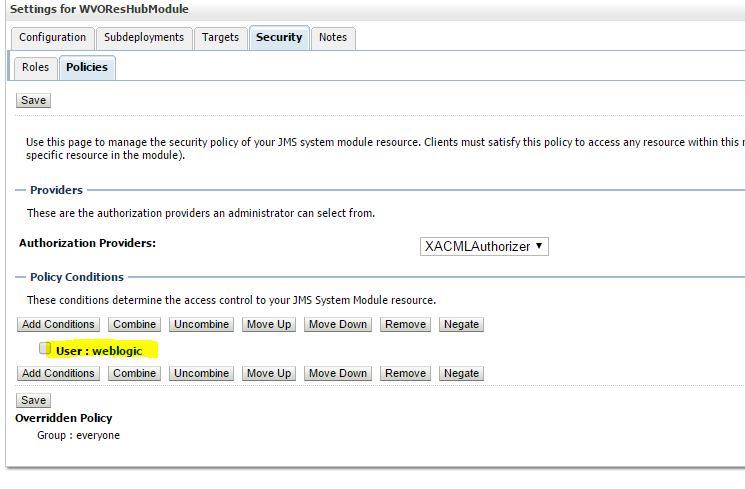

Now the policy used by changed from "everyone" to "weblogic". So weblogic user have only permission to read and write message to Topic/ Queue 


Adding Header in Service and Reference in BPEL 2.0 and BPEL 1.1 SOA - SOAP


simple test case with soapUI which adds an username and a message as HTTP header to the  service invocation.  In a second testcase I will mock this service in soapUI and BPEL will invoke this service and set an extra HTTP header property.


SOAP - BPEL


First step is to add a property to the binding.ws element of the service in the composite.xml. Add a property with name oracle.webservices.http.headers and as value the HTTP headers you want to use in BPEL
<property name="oracle.webservices.http.headers">username,message</property>


Next step is to define some BPEL variables for those HTTP Headers


In the receive activity of the BPEL process we can use fromProperty to copy the HTTP header property value to the BPEL variable. 

Do this in the BPEL source mode. 

BPEL 2.0


BPEL 1.1

  <receive>
  <bpelx:outputProperty name="username"    variable="usernameVar"/>
  <bpelx:inputProperty name="message"    variable="messageVar"/>
  </receive>


Now you can use these variables in BPEL, I will use these vars in the return message.

Let's invoke the service from soapUI, we need to set the HTTP header properties with their values.


When we want to invoke a reference service and we also want to set some HTTP header properties.

We need also need to set the http.headers property on the binding.ws element on the reference in the composite.xml

<property name="oracle.webservices.http.headers">username,message,message2</property>


On the invoke of the reference service we need to use the toProperty and set the BPEL vars to these HTTP header properties.

BPEL 2.0


BPEL 1.1 

  <invoke>
    <bpelx:inputProperty name="username"    variable="usernameVar"/>
  <bpelx:inputProperty name="message"    variable="messageVar"/>
  <bpelx:inputProperty name="message2"    variable="messageVar2"/>
</invoke>

When we test it again in soapUI we can see the invoke request of the soapUI mockservice,
 this contains the HTTP headers which we set in the BPEL process.


ExecutorService - Java - Parallel execution

ExecutorService - Java - Parallel execution    


import java.util.concurrent.ExecutorService;

import java.util.concurrent.Executors;


                  ExecutorService executor = Executors.newFixedThreadPool(2);
                     
                        Runnable worker1 = new accumulator();
                        executor.execute(worker1);
                     

                        Runnable worker2 = new claim();
                        executor.execute(worker2);
                 

                        executor.shutdown();
             
                        // Wait until all threads are finish
                        while (!executor.isTerminated()) {
                         
                        }


    public class accumulator implements Runnable {
                    @Override
                    public void run() {
                        try {
                         
                        } catch(Exception e){
                            e.printStackTrace();
                        }
                    }
    }
   
   
    public  class claim implements Runnable {
                    @Override
                    public void run() {
                        try {
                     
                        } catch(Exception e){
                            e.printStackTrace();
                        }
                       
                    }
    }