Search This Blog

How to Initiate process in OBPM 11g


   How to Initiate process in OBPM 11g  

 1. How to initiate OBPM process  in 11G ?
    
   Four ways  :  1. Human Activity  ( Initiator ) . 
                       2.  Message wait .
                       3. Timer .
                       4. Signal .


2. How can I achieve presentation in OBPM 11g ?

         In OBPM 10g  presentation available , but In OBPM 11g Oracle came up with ADF ( Application Development Framework ) so we can create rich application ( In simple term View  MVC pattern ).

please refer this link if you want to know more about ADF.


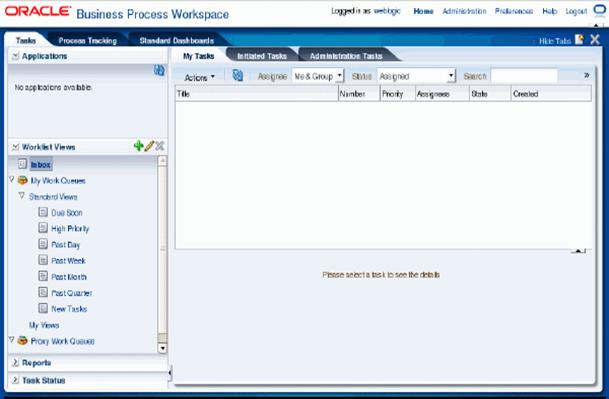
3. How can I see my BPM application in workspace ? any global activity present to  Initiate process ?

After you deployed OBPM Application in web-logic domain, you can able to see only your BPM project name in workspace, as per my knowledge   no global creation present in OBPM 11g .

Different Types Of Oracle BPM 11g user


Tutorial Three:
Different Types Of Oracle BPM 11g user and which tools they are using to develop and maintain BPM applications.
1.    How many users types in Oracle BPM 11g and what work users are doing?
Five types of user available in OBPM 11g

·   Process Analysts - Process Analysts are responsible for creating Initial flow of a business process and documenting in steps. (In simple words Requirement gathering).

·   Process Developer – Process Developers are responsible for implementing the process models created by process Analysts. ( In simple words coding part )

·    Business Administrator -   Business Administrator are responsible for administrating BPM Infrastructure ( In simple words managing BPM engines and Installation )

·   Process Owner – Process Owner responsible for controlling and managing the deployed business processes. ( In simple words , owner of the whole deployed  process  in live Environment ) 
·   Process Participant  - Process participants are the people using the business processes ( In simple terms End users )
  
2.    How can I access Console and why console?
why ?  – for deploying applications  ( In simple terms Application server )


Note :
From tutorial one and two I am using , Adminserver ( default server )
Url : localhost
Port : 7001 
Depending upon the machine where your web logic server running.
3. How Can I access BPM user workspace and why workspace?
                     http://localhost:7001/bpm/workspace
                    Why -  similar to OBPM 10g , everyone knows
 
             
4. How can I access Enterprise Manager and why Enterprise Manager?
Why? – To manage the whole Infrastructures


5. How can I access BPM composer and why Composer?
why – for modeling Purpose


6. Which tools used by process Developers?
Oracle BPM 11g Studio ( Jdeveloper )
7. Which tools used by process Analysts?
Oracle BPM composer or oracle Business process analysis
8. Which tool used by Business Administrator?
Oracle Enterprise manager

Creating user under weblogic domain and Import inside Jdeveloper to manage user roles


Tutorial : Two

Creating user under weblogic domain and Import  inside Jdeveloper to manage user roles


Click Security Realms


Click myrealm


Click Users and Groups  new


Adding user in web logic ( Krishna_domain )


User Created


Open JDeveloper -->  click Resource Platte


New Connection --> Application Server


Connection Name  : External_weblogic ( give any name )


My domain name : krishna_domain ( please choose exact domain name ) already created under c:/oracle/middleware/user_projects/domains/******* ( choose your  domain name ) 


BPM Project  --> Organization ( double click ) --> roles ( click plus sign ) 


Double click ( SalesRep ) --- > click search


Web-logic Users Imported Inside Jdeveloper .