Search This Blog

Select one Choice ADF - ValueChange Event ( Selected Values From Drop down )

   
 Select one Choice ADF - ValueChange Event ( Selected Values From Drop down ) 


Most of the developers face issue when using Select One Choice. Index display rather than selected Value.  


Jspx Code :
 

  <af:selectOneChoice value="#{bindings.DepartmentId.inputValue}"
                            label="#{bindings.DepartmentId.label}"
                            required="#{bindings.DepartmentId.hints.mandatory}"
                            shortDesc="#{bindings.DepartmentId.hints.tooltip}"
                            id="soc1" autoSubmit="true"
                            valueChangeListener="#{pageFlowScope.ValueMbean.ValueChnageMethod}">
          <f:selectItems value="#{bindings.DepartmentId.items}" id="si1"/>
        </af:selectOneChoice>


 Java Code :

 public void ValueChnageMethod(ValueChangeEvent valueChangeEvent) {
  

         System.out.println(" Selected Index ::: " + valueChangeEvent.getNewValue());

         BindingContainer bindings =BindingContext.getCurrent().getCurrentBindingsEntry();
         JUCtrlListBinding listBinding =(JUCtrlListBinding)bindings.get("DepartmentId");
         listBinding.setSelectedIndex(Integer.parseInt(valueChangeEvent.getNewValue().toString()));
         Row selectedValue = (Row) listBinding.getSelectedValue();

        System.out.println(" Selected Value ::: " +selectedValue.getAttribute("DepartmentId"));
    }


OutPut :


 Selected Index::: 11
 Selected Value ::: 100

 Selected Index::: 17
  Selected Value ::: 30

 Selected Index::: 23
 Selected Value :::  50

Increase SOA Data base performance by purge instance


DELETE FROM BPM_CUBE_AUDITINSTANCE A
WHERE EXISTS
(SELECT 1 FROM BPM_CUBE_AUDITINSTANCE B
WHERE A.COMPONENTINSTANCEID = B.COMPONENTINSTANCEID AND
B.OPERATION='INSTANCE_CREATED' AND
B.ACTIVITYSTATUS='PROCESSED')

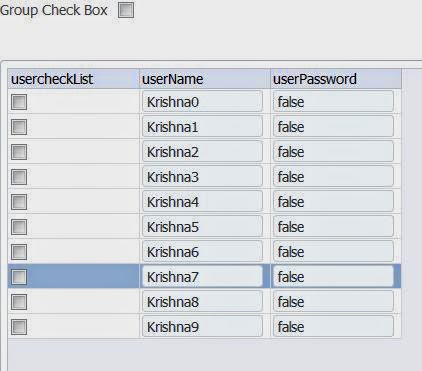
Group Check and Group Unchecked ADF Table ( Using Data controls ) RichTable tableBinding - PartialTarget

Group Check and Group Unchecked ADF Table ( Using Data controls ) using Java code  -
PartialTarget


Simple requirement Select all and un selected all row in ADF Table


Java code :


package view;
import javax.faces.event.ValueChangeEvent;
import oracle.adf.model.BindingContext;
import oracle.adf.model.binding.DCBindingContainer;
import oracle.adf.model.binding.DCIteratorBinding;
import oracle.adf.view.rich.component.rich.data.RichTable;
import oracle.adf.view.rich.context.AdfFacesContext;
import oracle.jbo.Row;
import oracle.jbo.RowSetIterator;
import oracle.jbo.ViewObject;

public class ClassDemo {

    private boolean masterCheckbox=false;
    private RichTable tableBinding;
   
    public void DemoValueChange(ValueChangeEvent valueChangeEvent) {
     
        String NewVal = valueChangeEvent.getNewValue().toString();
        DCBindingContainer dcBindings =(DCBindingContainer)BindingContext.getCurrent().getCurrentBindingsEntry();
        DCIteratorBinding dciter = dcBindings.findIteratorBinding("userDetailsIterator");
        ViewObject vo = dciter.getViewObject();
        RowSetIterator RowSetI= vo.createRowSet(null);
        RowSetI.reset();
        while (RowSetI.hasNext()) {
        Row row=RowSetI.next();
        row.setAttribute("usercheckList", NewVal);
        }
        RowSetI.closeRowSetIterator();
        AdfFacesContext.getCurrentInstance().addPartialTarget(tableBinding);
    }

    public void setMasterCheckbox(boolean masterCheckbox) {
        this.masterCheckbox = masterCheckbox;
    }

    public boolean isMasterCheckbox() {
        return masterCheckbox;
    }

    public void setTableBinding(RichTable tableBinding) {
        this.tableBinding = tableBinding;
    }

    public RichTable getTableBinding() {
        return tableBinding;
    }
}


JSPX Code :

   <af:selectBooleanCheckbox
                                      label="Group Check Box" id="sbc2"
                                      autoSubmit="true"
                                      valueChangeListener="#{pageFlowScope.CheckBoxMbean.DemoValueChange}"
                                      value="#{pageFlowScope.CheckBoxMbean.masterCheckbox}"
                                      partialTriggers="t1"/>


Table Property :


 <af:table value="#{bindings.userDetails.collectionModel}" var="row" contentDelivery="immediate"
                      rows="#{bindings.userDetails.rangeSize}"
                      emptyText="#{bindings.userDetails.viewable ? 'No data to display.' : 'Access Denied.'}"
                      fetchSize="#{bindings.userDetails.rangeSize}"
                      rowBandingInterval="0"
                        binding="#{pageFlowScope.CheckBoxMbean.tableBinding}"
                      selectedRowKeys="#{bindings.userDetails.collectionModel.selectedRow}"
                      selectionListener="#{bindings.userDetails.collectionModel.makeCurrent}"
                      rowSelection="single" id="t1">


Data now refresh using java code .


Happy Coding :-)